

220 – The Showdown: WordPress vs. Magento
Announcements
- March WordPress Webinar
- Why Jetpack Should Be Installed on Your WordPress Site
- Why Jetpack should be the first plugin installed on your WordPress site
- March 6th at 10am EST
- Register Today!
- WordCamp Dayton
- March 20-21st
- Purchase a Ticket
- Press Publish will be in Portland, OR on March 28 and Phoenix, AZ April 18.
- Customizer Theme Switcher is proposed for WordPress 4.2
Is there a plugin for that?
With more than 50,000 plugins in the WordPress repository, it’s hard to find the perfect one. Each week, I will highlight an interesting plugin form the repository.
For more great plugins, download my 50 Most Useful Plugins eBook.
Share Buttons by E-MAILiT is a plugin that helps your visitors share your content with social media icons.
Normally, I’m not a big fan of social icon buttons, but this one is cool because you can customize if you want all the buttons to be the same color to fit your theme or if you’d like them to be circles.
The Showdown: WordPress vs. Magento
We wrap up this showdown series, today we take a look at Magento.
I knew nothing about Magento when I installed it, except I had heard multiple people talk about it, so I had to give it a try.
It was the simplest of the three (including Drupal and Joomla) to get set up and I had no PHP errors getting set up.
It looks to be a great platform for setting up an eCommerce store and site.
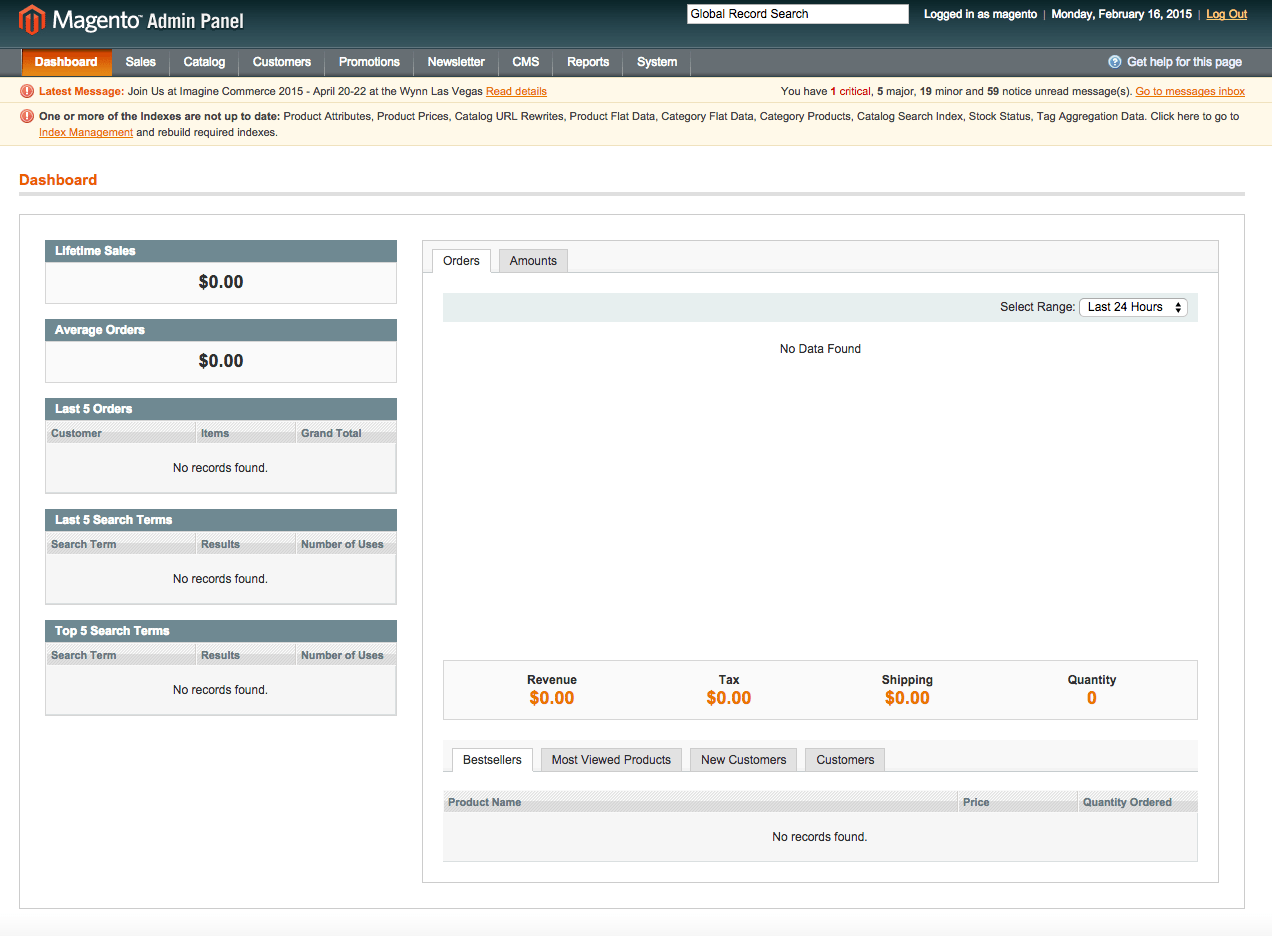
Have to pay to upgrade a site to include a blog for both Community Edition and Enterprise Edition.
Overall, I think Magento would be perfect for someone who is looking for an eCommerce store and needs lots of backend store information. Things like transactions, coupons, email correspondence are all handled perfectly by Magento.
Call To Action
Sign up for next webinar
Full Transcript
Business Transcription is provided by GMR Transcription.My name is Dustin Hartzler and I hope you are staying warm this time of the year, it is a 6° here in Ohio as I am publishing this and it is up to 1° that it was earlier this morning so it is really cold here and I am sure that some of you are experiencing some tropical weather and we are cold here in Ohio but nevertheless there is lots to talk about when it comes to WordPress so let’s go ahead and just dive right in.
We will let you know about the March webinar that is happening on March 6th at 10:00 a.m. eastern, you can register over Your Website Engineer.com/webinar and we are going to talk about Jetpack and why should Jetpack be your No. 1 plugin installed on your WordPress site.
There are so many reasons, there are so many different modules, there is like 30 plus modules that are inside the WordPress plugin. I am going to highlight some of the features, some of the best ones to use, why I like to use it, why it is the first plugin to be installed on my website and even some of the new features that are coming out.
Now in Jetpack you can also manage your WordPress site within WordPress.com. You can manage your WordPress.com sites your Jetpack; enable sites all in one place, you can update all your plugins, I am going to show you exactly how to do that and all those different types of thing so if you are interested March 6th 10:00 a.m. is the time and the date and you can register online, it is going to be an online webinar off course and you can watch it at your own convenience.
Be signed up and I will make sure you get an e-mail later that day with the information, otherwise, it would be published online later that month or later that day, I guess, I Usually get them out within one day or two.
Also, I will let you know about WordCamp Dayton. I am just continuing to plug this one because I want to have a lot of my friends to come and visit me here on Dayton.
It is not very often that there is a big event that is happening in Dayton that brings hundreds of people to the area, and so, it is March 21st or 20th and 21st. You can purchase your tickets at 2015.dayton.wordcamp.org/tickets and the billing is going to be shown for episode No. 220
We have got or we have over 60 plus people sessions that were submitted and we´ve got people coming from all over as far as L.A. and to come and speak at our WordCamp so we are really, really excited and it is going to be a lot of fun.
Tickets are I think are $40 dollars and it is well worth the $40 dollar investment to meet WordPress people and to hang out with me of course, why wouldn´t you not want to come to Dayton.
Hopefully I can promise that the weather might be, okay I can´t promise but hopefully the weather would be just a little bit warmer and you won´t have to freeze your tail off when you come to Dayton.
All right, next up, there is another WordPress event that I want to tell you about, it is called Press Publish and it is put on by Automatic and there are two upcoming events happening one is in Portland Oregon and that is on March 28th and one in Phoenix Arizona and that is on April 18th.
So this are, this is a brand new conference, a brand new idea of conference if you will and it is going to be a little different than our WordCamp, It is a more premium session or it is a more premium thing, it is a one day deal and it is $250 to get in and the goal is to help, to help level up your blog or to make you a better blogger, to give you information about how to blog on the go and just have a real use of WordPress.com.
You will also get, I guess you will also with the purchase of you ticket, you get a WordPress.com premium upgrade that is $100 dollar value that you can use on any of your WordPress.com blogs. So, you get an e-mail once you are signed up to get all that information set up in one night.
I was really excited to go to the Portland, I really wanted to go and wanted to go and you know wanted to really help up but it is just, it didn´t work out and it was just, it´s much more cost effective for the people of Automatic to send somebody from east coast rather than fly me all the way from Dayton.
So, Hopefully if this two pilots go well they are going to start moving this around U.S and have this locations that Press Publish kind of be like a sponsored event by Automatic and then do that, you know have those events across de U.S, so that is on the link to look forward to.
And finally, today in the news section the customizer themed switcher is, officially has been proposed for WordPress 4.2 and so what this means is — the customizer is that panel that kind of slides over from your left when you are in your cells of, it is under the appearance and then it is called customizer and it gives you the ability to change your site title, your head line and some of the newer themes are building in a lot of extra features an a lot of extra functionality.
With this things well now the proposal is to be able to change your theme right from this area so you can go and you can actually do a live preview of what your theme look like and you can do that all from the customizer panel, this doesn’t mean that this will actually be inside the customizer but it has been approve or it has been proposed if you will and it should be making its way, hopefully if the development goes well it will make it in to 4.2.
There is an article over on WP Tavern that shows a little video, a 2 minute video of what this actually does and how this will work, so if you are interested I will recommend going over and checking that out.
Al right is there a plugin for that? Yes, there is always a plugin for that it seems, with 35,000 plus plugins that are on the WordPress repository it seems like there´s always plugins to do exactly what you like.
And today the plugin that I want to share with you it´s called Share Buttons by EMAILit, and usually I´m not the guy who is a promoting the different types of share buttons because honestly I like the ones there are on Jetpack and there is just some many of them out there that I can´t really say Oh pick this ones or this ones, well this ones are really, really cool for just a couple reasons
And so the main reason that I highlighted and just wanted to point it out is that plugin that was recently updated, it has more than 212000 downloads, but the cool part is that you could do standalone buttons with a custom color.
This is really, really cool so you could do just a regular standalone large sharing button which give you a square with like the regular Facebook icon, the twitter icon, Pinterest, you know, all of them they've got hundreds, not hundreds but, lots of the most used and frequently added to site so Facebook, Pinterest, Twitter things like that. But then they also have the customizable ones, so if you wanted your social icon buttons to fit in perfectly with your website all you have to do is to put in the hexadecimal code of the color that you want and it will automatically change the entire image to be that color within the white logo on the inside.
Which I thought that was cool, like is a really neat think because there's so many times that you want to kind of blend in those social icons instead of having, you know, if you're if your website is a typical or it's kind of a blue and green themed and then you throw these red buttons or the Facebook blue button that it's not quite the same blue button as the Twitter icon which is the same size as your site it can get kid of messy.
So I thought that was cool, and they also have the ability to do circular buttons so you can do the square ones or you can do circular ones and it is all built right in within this plugin.
So, that was kind of the main reason that I pointed this one out and it was, that just kind of excited me because it had the ability to make the custom looks that they are so that's why recommended that is called EMAILit or Social Buttons by EMAILit.
Al right, today we are going to wrap up this showdown series and we're going to be talking about Magento today and I'm kind of excited and kind of sad at the same point to be kind of closing this kind of small little miniseries up.
The main reason I am kind of disappointed is because it's been easy to come up with topics like, I know I have a list of hundreds of different things to talk about but it's always been kind of fun to go through and just say oh! I am going to check out this platform this week and I am going to check out this one, I am going to check out this one and it makes it for an easy episode for me to prepare.
Well I know that you are subscribed because you are interested in WordPress and not necessarily in how all of these other platforms work but I think that there's some value in learning and just kind of figure out how some of these other ones work.
So, — we are going to be. Today was going to be the last one that we going to do and we are going to cover and then maybe, a few years down the road I will try them again, except for Joomla! We are never trying Joomla! Again remember that from last episode.
But that's, it's just kind of interesting and I have got a whole bunch of WordPress topics specific to WordPress that we're going to be talking about in the next couple weeks and so with that we're just going to wrap this thing up and we're going to talk about, today we're going to talk about Magento.
Magento was one that had, the name is been kind of thrown around a lot, I've heard a lot about Magento and people compare Magento to WordPress and things like that and I really had nothing, I know nothing about Magento so I knew that I was able to use the quick install within my WordPress dashboard and so I can install it so I didn't have to try to figure out how to install this thing and so I went ahead and did that, I set up a sub domain, I´ve got it all install and this is the first one of the three Joomla!, Drupal and Magenta.
This is the first that gave me zero errors and there was nothing else that I had to configure with my hosting company to get everything set up and working properly so I liked that.
Then I got it set up and I started looking around and was — wow! This really looks like an easy way to sell stuff, this really looks like a platform that you can just go out and sell everything that you need. And so then I started digging around a little bit more and I thought — hey! Maybe I should just check out the Wikipedia page, what Wikipedia says about Magenta. And basically it says it is an open-source content management system for e-commerce websites — aha! It’s for e-commerce websites.
Okay, that makes a lot of sense, that's the way it is designed as it is it is designed to be an e-commerce website so okay, perfect, now I am on the right game plan, now I have got the right mindset when I'm looking at this software, at this platform.
It looks like it was developed and it was first released on March 31st, 2008 so that is right around the same time as WordPress came out, no scratch that word press came out in 2003 never mind, my upcoming dates mixed up, so make out on 2008 and the creator actually sold a big share of the company to eBay who is now the sole owner so that was another thing that I have learned that Magento now owned by eBay.
Okay that's making sense because when I logged in and I look actually on the homepage it says now accepting PayPal like just the generic standard page that was created for me I was, oh now accepting Paypal.
Okay, everything it is starting to make sense now it´s almost like when I did the study with Rainmaker, everything looked like WordPress and then I realized it was a glorify version of WordPress and so I was, Okay things are finally making sense.
I went through and I looked through the overview and they have a couple different additions, if you will, of Magento that the community edition which is the open-source content management system anyone can modify the Core System and developers can implement core files and extend functionality by plugins, modules and stuff like that.
And then they have an enterprise edition which is derived from the community edition, has the same core files but this one has more features and it is not free, it is designed for large businesses that require technical support with installation, usage, configuration and troubleshooting and it has annual maintenance fees and it doesn't include hosting so you have to pay for the software to use but then you also have to pay for your hosting. So that's the enterprise edition.
And it looks like they used to have what was called Magento go which was a cloud base e-commerce solution which was, that included hosting so kind of like WordPress.com it was launched in 2011 and then they close up shop on July 20th of 2014.
So, I guess it shutdown actually in February 1st, 2015 is when the doors finally closed, just this month it actually closed and everything like that.
So the Magento has a couple of features, it has themes of course which are basic themes that will just set up an e-commerce website, the theme is designed for customizing all pages by adding or editing the PHP or a similar CSS code.
Magento users can install themes which change the display of course that obviously makes sense, we want to make sure that we can change with the way that the site looks, and then without the loss of content or layout pages all themes are interchangeable with Magento installations which is a lot like all the other things, WordPress you can change a theme in and out no big deal.
The themes are installed by uploading the theme via SSH or FTP and then you imply them, you turn them or you activate them if you will, from behind, from the backend admin system.
They have plugins, called modules and they basically do what plugins do on WordPress they extend the basic built-in functionality, you can download them and then you can upload them to the server or, you can actually apply a modules extension key through a Magento connect manager and so that is another way that you can do it.
I did have to look through and I found a couple of plugins out there that you actually needed to create a blog and so I was trying just figure out like what do I need to do, how do I set up a blog post cause that is kind of what I have been doing with these challenges like okay I want to create a blog, I want to create a blog post and I want to create a site and so how do I go ahead and do that. So they have a professional version and they have just the regular community addition so I guess it depends on which version of Magento you are using.
So the community addition is $49 dollars to download to give you the ability to have a blog and that includes the RSS feeds, you know, abilities to switch on and off from different stores, you have the latest post widget, you can have, let´s see what else you can do, you can have an excel field, a text field, you have a tag blog. All the themes are built-in with this plugin or this module.
And then with the extension for the professional and the enterprise edition includes all those but it just works with the premium version of Magento. So that was something I found kind of unusual I mean, it was different but okay once I realize that this is a shopping cart it made sense that this wasn't for a blog.
And so that's basically kind of a nutshell what Magento is how to use it when you go inside the dashboard, their dashboard it is very apparent it is made for e-commerce platform. It shows right there on the dashboard it has like little dashboard areas that shows lifetime sales, average orders, last five orders, last five search terms, top five search terms, and then it shows like a graph of all of my recent orders and the amounts and so how much revenue, how much tax, how much shipping, quantity, all that kind of stuff.
You can see the bestsellers, most viewed products, new customers and customers you could see all of that right from the dashboard, —doesn't look like you can. You can customize the dashboard in anyway shape or form, there is no way to actually go in and configure this page to get more useful information for you.
It´s got an admon menu that goes across the top with dashboard sales, catalogs, customers, promotions, newsletters, CMS reports and systems so of course most of those sound just like they are the sales gives you the ability to look at orders, invoices, shipments, credit, memos, transactions, it´s basically WooCommerce as its own stand-alone installation.
So I can see that it is working really well if you wanted to have a dedicated system that's really good and really focus on taking payments or maybe you have somebody that is on a different team that is building out your website and they don't want, they have nothing to do with WordPress they don´t want to have to try to figure out of how to install the Plugins and widgets models and then maybe you just turn your shop, your website.com or your store.website.com or your website.com/store whatever that URL as you turn into a separate site and then you run Magento as your sales funnel and run all of these things so people can purchase and checkout all that stuff right through Magento.
It looks like you can create a custom theme and it looks like it's going to be kind of difficult to do to get that same look and feel of your normal side like a means for magenta developers is probably not difficult but it looked a little cumbersome to me.
You also can look at your catalogs to see other products, the different categories you have, you can see what search terms people are looking for, you can actually set up customer reviews and so people can review and people can do that right from the front end and once they purchase an item which is really cool you can manage your customers, you got your online customers, your actual customers that you ship stuff to, you can put all of the information in there that when they fill it out on the website it's all integrated back in so it's got their name, email address, telephone, zip, country, state, you know everything.
It gives you the date that they were a customer, it gives you the date that they purchase something to give you the information of what they bought so you can kind of work through and figure out,
You can learn all this information about your customers.
It looks a little bit more robust than WooCommerce, it's got all this information built right in but it looks like it's not nearly as I want to say like the Attmans, it doesn't look nearly as polished, I mean, it looks like a lot of tables and stuff, it looks good, it would work and it seems like it works really well and it seems like it would, it manage a lot of data really well but off course I don’t have anything in here to really compared to because I don't have you know, I haven´t set up an actual website with this.
So, they have got some different promotion areas where you can have different rules for your promotions whether their catalog purchase our catalog price rules or shopping cart price rules o maybe if you had like oh if somebody gets this and this and this they will get a 20% discount you can do all of that kind of stuff through Magenta.
You can run a newsletter right through this so you can send newsletter information straight —to your, to the people who has purchase from you which is really helpful and really nice so that you're not trying to manage like, okay, this people purchased from WooCommerce and they purchase it within my website and now I´ve got to move them somewhere so that they are like you know, do they link with Mail chimp do they link with male poets did you go with awebber like we're all the stuff, you know, where is everything pieced together so that's really nice.
You can have picked different template you can queue up different newsletters you can set them up so when somebody purchases something 4 days later they ask them for review you can do all that kind of stuff.
You can also in the CMS section of the menu that's where you create your pages you create strata blogs you can do widgets and you can do post so if you want have some sort of survey for your customers you could send that right up. One of the things that I found that was kind of neat is that it actually has six pages already built for you and it already has it all set up for you so they got the about us customer service, enable cookies, home page not found and privacy policy.
So I can see exactly what those are and you can see what layout they have whether its two columns with the right sidebar, three columns or one column, you can see all that kind of from the dashboard of my all pages area. So that is pretty cool, I think that's nice that you can go and you can see some different layouts with some text in it so that you can go and kind of understand, okay this is how this template works and this is how this template works.
There is a hole section with a slew of menu options for reports weather you want to see sales reports or how many people put stuff in shopping carts and didn't actually check out, what products you have, what customers you have, what kind of tags you are using, all that stuff.
And then you´ve got the system menu where you can look at my account information, you could see different tools and that includes a backups, compilations, you can see web services, you can see the different services that are running to run your website, you can see all your variables, transactional emails, you can manage what currency that you're using with the different rates, import and export, there is a lot of stuff in here and of course I didn't have time to dig into it all and set up this fake shopping cart and all that kind of stuff.
But it looks amazing it looks like this would be something that if you really wanted to have a robust store and set it up completely separate from WordPress whether you're not a big fat WordPress or if maybe you're using WordPress.com for your website and you want to have a system that's worth, a shopping cart I think that Magento would be the perfect one.
There is so much goodness that I see here it looks like it's going to be a very powerful platform so I would definitely check that out if this is something that interests you this is not going to be for somebody who just wants to sell one or two items on their website you know, if you want to sell something small or evening e-book or something like that WooCommerce is going to work, exchange by ithemes is going to work, there is a lot of WordPress plugins that are going to do things just equally as well but you don't, if you're not managing a lot of different moving pieces and parts and stuff like that then definitely I would stay away from Magento.
I think that this reminds me a lot of like a some of the, some of the systems and stuff that I used when I was an engineer at Whirlpool, everything is very basic there is no like Dragon drop or anything it's all like enter your information you edit it you can just click on things and in open up a tab or open up a new table or open up a field in the table and edit the things and stuff like that.
So it is super nice it looks good at least I can figure out more than I could with Joomla! With Joomla! I had no idea what was going on in this actually everything intuitively make sense.
I didn't spend a lot of time trying to make my website look what it what it should but I think if I would just go in and uploaded a theme and you can find themes online that I would be able to kind of change the look and feel of my website pretty easily.
The main default theme —has just some. It is got the account information so there's an account in a cart so that's all built-in, all that stuff is built-in and you don't have to worry about where I put the cart logo and where I put the sign in logo in my account information and all that kind of stuff and so it makes it real simple when somebody checks out it automatically makes an account for you and all that kind of thing so that all works and it looks cool and I would recommend if you were interested in them go ahead and check that out.
So that is going to be a wrap for this week’s episode in this showdown series, a two part miniseries I'm finally done with that.
We are going to talk about WordPress next week we are going to talk about some my favorite features of WordPress and why I am so excited about the launch of my new website yes will be talking about that next week and that is a big, big deal for me this is a project that I have been working in since September of last year I wasn´t super focused on it in September of last year but nevertheless I spent a lot of hours for the last couple of months getting it ready and I hope to review it next week for you on this week or the next week´s episode of the podcast.
That is all I wanted to share with you this week I hope you have enjoyed this sessions and that you have enjoyed learning about the different platforms within the WordPress, al right that is it I will talk to you next week, take care, bye, bye.

